Beginner’s Guide to Kubernetes for Developers: Understanding Container Orchestration and Deployment
Kubernetes has emerged a game-changing technology for developers looking to streamline applications and improve deployment processes. As a powerful open-source platform for automating the deployment, scaling, and management of containerized applications, Kubernetes is essential for modern software development. This guide will navigate the fundamentals of Kubernetes, covering everything from its architecture to its comparative advantages over other container orchestration tools. Developers often grapple with complex infrastructure needs, and Kubernetes offers a solution that simplifies this challenge through its effective orchestration capabilities. In this article, we will explore what Kubernetes is, how it functions, and best practices for utilizing its features effectively.
Key Takeaways
- Kubernetes automates deployment, scaling, and management of containerized applications across clusters for developers.
- The platform uses a master-slave architecture to orchestrate pods, ensuring high availability and reliability.
- Key Kubernetes components include master nodes, worker nodes, pods, and services for efficient application management.
- Kubernetes differs from Docker by focusing on container orchestration rather than container creation and runtime.
- Popular alternatives to Kubernetes include OpenShift, Docker Swarm, and Apache Mesos, each with unique features.
- Setting up Kubernetes clusters involves installing tools like Minikube and deploying applications via configuration files.
- Pods are the smallest deployable units, enabling containers to share resources and communicate effectively.
- Scaling Kubernetes deployments uses Horizontal Pod Autoscaler, Cluster Autoscaler, and resource limits for efficiency.
- Monitoring tools like Prometheus, Grafana, and kube-state-metrics provide insights into Kubernetes cluster performance.
What is Kubernetes and Why is it Essential for Developers?
Kubernetes is a powerful system for managing containerized applications across a cluster of machines, facilitating both declarative configuration and automation. Its significance lies in its ability to orchestrate containers, ensuring they run effectively, are easily deployable, and can scale according to demand. As developers work in increasingly complex environments, Kubernetes simplifies the orchestration of these containers, allowing teams to focus more on writing code than on managing infrastructure.
Kubernetes: Advanced Features for Production-Grade Services
We posit that this is attributable to its highly intricate architectural design. Indeed, Kubernetes stands out as the solution offering the most comprehensive feature set for the management and deployment of production-level services.
Container orchestration engines: A thorough functional and performance comparison, IM Al Jawarneh, 2019
How Does Kubernetes Manage Container Orchestration?
Kubernetes manages container orchestration through a range of features designed to automate deployment and scaling. It uses a master-slave architecture where the master node manages worker nodes. Containerized applications, grouped into logical units called pods, are deployed on these nodes. Kubernetes continually monitors the state of the nodes to ensure desired functionality is maintained, automatically restarting containers that fail and scaling applications up or down as traffic demands change. This proactive management ensures high availability and reliability, which is crucial for production environments.
What are the Key Components of Kubernetes Architecture?
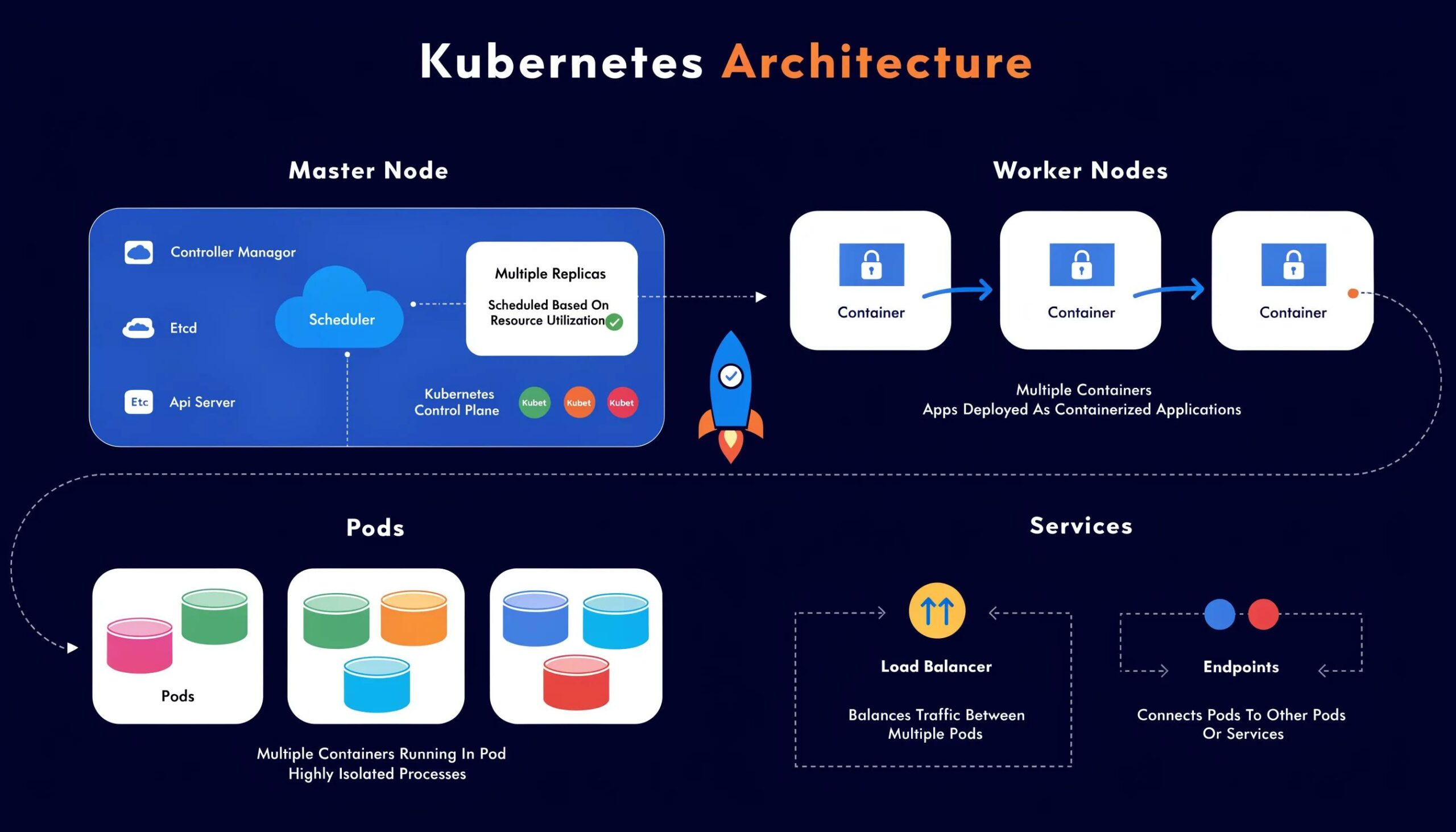
Understanding Kubernetes architecture is crucial for leveraging its full potential. The main components include:
- Master Node: Responsible for managing the Kubernetes cluster.
- Worker Nodes: Hosts the pods and runs the actual applications.
- Pods: The smallest deployable units in Kubernetes, which can contain one or multiple containers.
- Services: Define a logical set of pods and a policy for accessing them.
Together, these components create a robust framework that supports the automatic scaling, monitoring, and deployment of applications in a cloud-native environment.
How Does Kubernetes Compare to Docker and Other Container Orchestration Tools?
Kubernetes is often compared to other tools like Docker due to its capabilities in managing containerized applications. While Docker simplifies the containerization of applications, Kubernetes provides a higher-level orchestration layer that enhances operational efficiency.
Kubernetes: An Open-Source Platform for Container Orchestration
Kubernetes, an open-source platform designed for automating the deployment, scaling, and operational management of application containers, has become a prominent solution for container management. This paper presents a comparative analysis focusing on the enhancement of container management through Kubernetes, evaluating its functionalities and benefits compared to alternative container orchestration tools, such as Docker Swarm and Apache Mesos. The study commences with an exploration of the foundational principles of containerization and the complexities inherent in managing containers at scale. Subsequently, we delve into the architectural framework of Kubernetes, emphasizing its core components, which include the API server, etcd, scheduler, and controller manager.A comparative study on enhancing container management with Kubernetes, 2024
What is the Difference Between Docker and Kubernetes?
The primary distinction between Docker and Kubernetes is their roles in the container lifecycle. Docker is focused on building, running, and managing containers, whereas Kubernetes orchestrates containers across clusters, managing their deployment, scaling, and networking. Developers usually utilize Docker for a single container instance, while Kubernetes is ideal for managing infrastructure at scale, providing services like load balancing and ensuring application resilience.
Which Container Orchestration Tools Are Popular for Developers?
A variety of container orchestration tools are available aside from Kubernetes, each offering unique features. Some popular options include:
- OpenShift: An enterprise container platform based on Kubernetes that offers additional tools for developers.
- Docker Swarm: A simpler orchestration tool native to Docker for managing clusters of Docker engines.
- Apache Mesos: A cluster manager that can also manage Kubernetes and Docker containers.
These tools each serve different needs depending on the scale and specific requirements of the applications being deployed.
How to Set Up and Understand Kubernetes Clusters: A Beginner’s Tutorial
Setting up a Kubernetes cluster can seem daunting at first, but with a structured approach, developers can easily navigate the process.
What Are Kubernetes Clusters and How Do They Work?
A Kubernetes cluster consists of a set of nodes, both master and worker, which manage the deployment and operation of containerized applications. The master node handles the orchestration of the cluster, while worker nodes are responsible for running the actual applications in pods. This architecture allows for high availability and scalability as Kubernetes can automatically allocate resources across nodes based on demand.
Step-by-Step Guide to Deploying Your First Application on Kubernetes
- Install Kubernetes: Use tools like Minikube to set up a local Kubernetes cluster.
- Deploy an Application: Create a configuration file defining your app’s deployment and service.
- Monitor the Deployment: Use kubectl commands to track the status of your application and troubleshoot any issues.
By following these steps, beginner developers can efficiently deploy their first application on Kubernetes and understand the basics of managing their containerized workflows.
What are the Main Kubernetes Components: Pods, Nodes, and Services Explained
To utilize Kubernetes effectively, it is important to grasp the roles of its key components: pods, nodes, and services.
What is a Kubernetes Pod and Why is it Important?
A Kubernetes pod is the smallest deployable unit, which can run single or multiple containers. Pods provide an abstraction layer over containers, enabling them to share network and storage resources. This functionality ensures that containers within a pod can communicate efficiently, making them ideal for tightly coupled applications. Understanding how to utilize pods is critical for developers aiming for a microservices architecture.
How Do Nodes and Services Enable Cluster Functionality?
Nodes serve as the physical or virtual machines that host pods, managing the workloads associated with applications. Services in Kubernetes abstract access to pods, providing a stable endpoint for interacting with groups of pods, no matter how they change over time. This allows developers to create resilient applications that can adapt without downtime as backend changes occur.
How to Scale and Monitor Kubernetes Clusters for Efficiency

Scaling and monitoring are vital activities for maintaining optimal performance in Kubernetes environments.
What are the Best Practices for Scaling Kubernetes Deployments?
- Horizontal Pod Autoscaler: Adjust the number of pods based on CPU utilization.
- Cluster Autoscaler: Automatically adjust the size of the cluster in response to demands.
- Resource Requests and Limits: Define appropriate resource limits for pods to optimize scheduling.
These best practices ensure that resources are efficiently utilized, adapting to real-time traffic needs.
Which Tools and Metrics Help Monitor Kubernetes Performance?
Various tools can assist in monitoring Kubernetes performance, including:
- Prometheus: An open-source monitoring solution designed for reliability and scalability.
- Grafana: A visualization tool that works well with Prometheus for displaying metrics.
- Kube-state-metrics: Exposes cluster-level metrics to be consumed by other monitoring solutions.
By utilizing these tools, developers can gain insights into the performance and health of their applications.
What Are the Common FAQs Developers Have About Kubernetes?
Developers often have questions regarding the complex mechanics of Kubernetes and its practical applications.
How Does Kubernetes Manage Container Orchestration Effectively?
Kubernetes employs a variety of mechanisms for effective container orchestration, including self-healing, automated deployments, and scaling based on real-time demand. By maintaining the desired state of applications, Kubernetes ensures that they run smoothly and recover quickly from failures.
What Are Typical Use Cases for Kubernetes in Development?
Kubernetes is utilized in numerous scenarios, such as:
- Managing Microservices: Deploying complex applications split into multiple services.
- Continuous Integration/Continuous Deployment (CI/CD): Automating the testing and deployment processes for faster releases.
- Hybrid Cloud Deployments: Successfully running applications across multiple cloud environments with ease.
These use cases demonstrate Kubernetes’s flexibility and utility in modern development practices.
Frequently Asked Questions
What are the system requirements for running Kubernetes?
To run Kubernetes effectively, you need a system that supports container technology. Typically, you will require a multi-core processor, at least 8GB of RAM, and ideally access to SSD storage for performance. The operating system can be Linux-based, such as Ubuntu, CentOS, or Debian. Additionally, it’s essential to ensure your network can handle Kubernetes networking requirements, including pod communication and service discovery. Cloud service providers also offer managed Kubernetes services that abstract these requirements.
Can Kubernetes manage stateful applications?
Yes, Kubernetes can effectively manage stateful applications by utilizing StatefulSets, which provide unique network identifiers and stable persistent storage for each pod. StatefulSets allow developers to deploy applications that require stable storage, consistent network identity, and ordered deployment and scaling. This ensures that databases or applications with specific identity requirements can function reliably even when scaled or modified, making Kubernetes versatile for application types beyond stateless microservices.
What is Helm and how does it relate to Kubernetes?
Helm is a package manager for Kubernetes, similar to what apt or yum is for Linux distributions. It simplifies the deployment and management of Kubernetes applications by allowing developers to define, install, and upgrade complex applications with just a few commands. Helm uses Helm Charts, which are packaged formats containing all necessary Kubernetes resources, configurations, and dependencies. This streamlines the installation process and fosters consistency across multiple environments.
How can I secure my Kubernetes cluster?
Securing a Kubernetes cluster involves multiple best practices: firstly, applying role-based access control (RBAC) to limit user privileges appropriately. Secondly, using network policies to control the traffic flow between pods helps mitigate unauthorized access. Additionally, regularly updating Kubernetes and its dependencies can address vulnerabilities, while leveraging tools like Kubernetes Network Policies and Pod Security Policies enhances your security posture by enforcing policies at the network and pod level.
Are there costs associated with using Kubernetes?
Kubernetes itself is an open-source platform, so there are no licensing fees involved in using the software. However, costs arise from the underlying infrastructure, such as the cloud services (like AWS, GCP, or Azure) where you may deploy your clusters. Considerations include compute resources, storage, and network egress charges. If you opt for managed Kubernetes services, there might be additional service fees that vary depending on the provider’s pricing model.
What is kubectl and how is it used in Kubernetes?
kubectl is the command-line interface tool that enables users to interact with Kubernetes clusters. It allows you to manage cluster resources, deploy applications, view logs, and monitor the cluster state. Commands like for deploying configurations and for retrieving resource information are foundational to working with Kubernetes. Learning to use kubectl is critical for performing most administrative tasks in a Kubernetes environment.
Conclusion
Embracing Kubernetes brings unparalleled advantages for developers in managing containerized applications efficiently. By automating deployment, scaling, and orchestration, it enhances operational efficiency while allowing developers to focus on core tasks. To further your understanding and leverage Kubernetes for your projects, explore our in-depth resources and guides. Start your journey towards mastering container orchestration today!