
A Guide to Mobile App Performance Optimization: Boosting Speed, Reliability, and Efficiency
Mobile app performance optimization means making your app faster, more reliable, and more efficient by reducing latency and resource use. This leads to quicker launches, fewer interruptions, and smoother interactions for users. This guide dives into the core mechanisms that drive performance—efficient code, smart memory management, streamlined network delivery, optimized rendering, and robust observability. We’ll show you practical ways to cut down on startup time, minimize buffering, and save battery life, all while keeping the user experience top-notch. You’ll learn actionable techniques for structuring your code, reducing data payloads, using CDNs and adaptive streaming effectively, implementing UI rendering and lazy-loading patterns, conserving battery and data for streaming apps, and understanding the key metrics and monitoring needed to maintain performance as your app grows. Performance is crucial because slow or unreliable apps drive users away: 29% of smartphone users will look for alternatives if an app is sluggish, and 53% will uninstall it if it’s slow or crashes frequently. Optimizing for speed directly impacts user retention. For streaming services like Netflix, Inc., a global streaming entertainment provider whose business heavily depends on its mobile app used by millions worldwide, mobile performance is paramount. This article is based on current best practices and benchmarks, ready for implementation today (datePublished: 2024-04-22).
Simple solution: Focus on reducing app startup time and latency by profiling your app to identify slow areas and optimize those critical paths first.
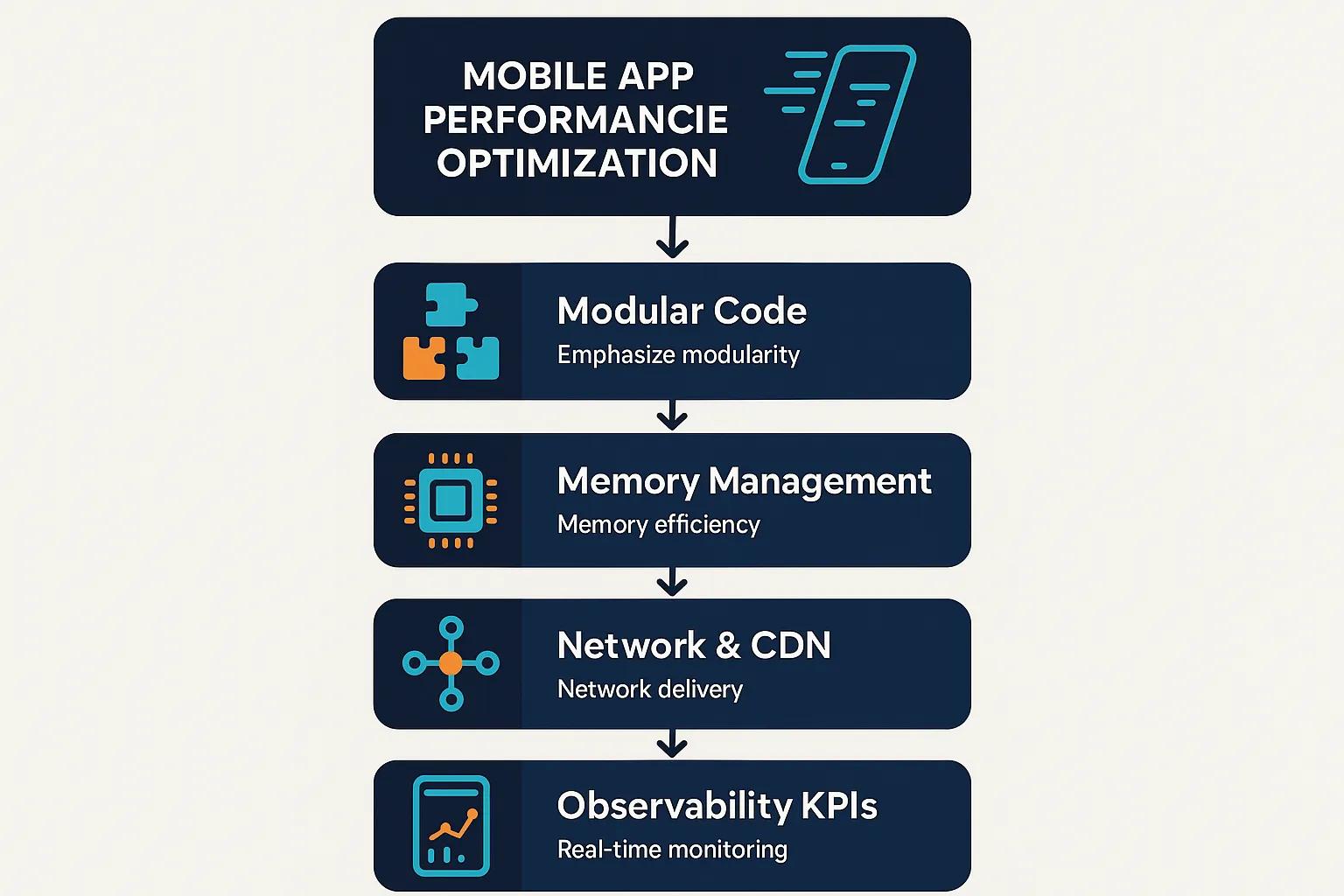
How can you optimize mobile app code for performance?
Code-level optimization is about minimizing the work your app does at startup and during runtime, reducing its memory footprint, and preventing UI thread freezes that lead to jank and crashes. An efficient, modular architecture with deferred loading for less-used features shortens cold start times and makes updates safer for large user bases. Smart memory management avoids long garbage collection pauses and leaks that can slow down the app over time. Offloading heavy tasks to background threads and using asynchronous patterns keeps the UI responsive for user interactions. Here are the core tactics developers should employ in almost every mobile app project to enhance speed, stability, and efficiency before focusing on network or rendering optimizations.
Simple solution: Break your app into smaller modules and use asynchronous programming to keep the UI thread free and responsive.
- Embrace modular design and code-splitting to defer loading non-critical features until app launch.
- Move intensive CPU tasks off the UI thread using asynchronous workers, thread pools, or native concurrency tools.
- Remove unused resources, minify code, and apply tree-shaking to decrease binary and bundle sizes.
Efficient code architecture and modular design
A well-structured code architecture breaks down features into modules that can be loaded on demand. This ensures the app only loads what’s necessary at startup, presenting the most critical UI elements quickly while fetching secondary screens as needed. This directly cuts down initial download times and cold-start execution. Using dependency injection and clear interfaces prevents unintended code coupling, speeding up incremental builds and testing. Build-time analysis tools like tree-shaking eliminate dead code, shrinking the app’s install size. Modularization also allows for phased rollouts of major features and limits the impact of regressions, supporting continuous delivery and faster recovery from issues.
Simple solution: Design your app so that only essential components load initially and add other features progressively after launch.
For practical implementation, focus on creating small feature modules, defining strict public APIs, and using CI checks to enforce bundle size limits, ensuring architectural decisions remain effective across releases.
To summarize, consider small feature modules, strict public APIs, and CI checks that enforce bundle-size budgets so architecture decisions stay effective across releases.
This comparison illustrates how architectural choices translate into measurable reductions in startup time and memory usage, leading into the discussion on memory management and GC tuning.
Simple solution: Regularly review your app architecture to ensure it uses lazy loading and code elimination tools effectively.
Memory management and garbage collection
Effective memory management requires proactive profiling to identify long-lived references, listener leaks, and overly large caches that prevent timely memory reclamation and trigger costly garbage collection (GC) cycles. Common sources of leaks include persistent listeners, static references to UI objects, and caching strategies without proper eviction policies. Using weak references and tokenized listener removal can prevent these issues. Incorporating periodic profiling into your CI process, along with smoke tests that simulate extended user sessions, helps detect regression patterns early and allows teams to set memory budgets. For managed runtimes, minimize temporary object allocations on frequently executed code paths and favor object pooling or reuse where appropriate to reduce GC frequency and pause durations.
Simple solution: Use memory profiling tools regularly and eliminate persistent references to free memory faster and reduce app slowdowns.
Further investigation reveals the significant impact of memory leaks on overall smartphone
and battery performance.
Mobile App Performance Optimization Solutions
This table summarizes essential strategies for optimizing mobile app performance, focusing on key solutions that enhance speed, reliability, and user experience. Each solution addresses specific performance challenges commonly faced in mobile applications.
This table highlights the various strategies that can be implemented to optimize mobile app performance, ensuring a better user experience and improved app reliability. By focusing on these solutions, developers can effectively address common performance challenges in mobile applications.
Simple solution: Prioritize strategies that have immediate impact like modular design and network optimization, then progressively add others.
Mobile App Performance Optimization Solutions
This list highlights essential strategies and techniques for optimizing mobile app performance, focusing on improving speed, reliability, and the user experience. Each solution is designed to tackle specific performance challenges common in mobile applications.
- Modular Code Design – Adopting a modular architecture enables lazy loading of features, which reduces initial load times and memory consumption.
- Efficient Memory Management – Proactively managing memory helps prevent leaks and prolonged garbage collection pauses, thereby enhancing app responsiveness and battery efficiency.
- Network Optimization Techniques – Minimizing API calls and compressing data payloads can significantly decrease latency and improve the efficiency of data transfer.
- Adaptive Streaming – Employing adaptive bitrate streaming ensures smooth video playback by adjusting video quality based on available bandwidth, thus reducing buffering.
- UI Rendering Optimization – Aiming for 60 FPS and minimizing layout shifts through GPU acceleration results in smoother interactions and a superior user experience.
- Lazy Loading of Non-Critical Elements – Deferring the loading of non-essential UI components improves perceived speed and reduces overall resource usage.
- Battery Life Optimization – Implementing strategies like batching background tasks and utilizing hardware-accelerated codecs helps conserve battery power during streaming.
- Continuous Performance Monitoring – Regularly tracking key performance indicators (KPIs) facilitates the rapid detection and resolution of performance regressions.
- Content Delivery Networks (CDNs) – Leveraging CDNs reduces latency by serving content from servers geographically closer to users, improving load times and reliability.
Simple solution: Implement these solutions incrementally and monitor user feedback to guide your optimization priorities.
Memory Leaks and Battery Drain in Smartphone Apps
To better understand memory leaks in smartphone apps, we identify the memory objects primarily responsible for memory leaks within the background application mechanism, a critical component of mobile operating systems. Our study demonstrates that memory leaks are a major cause of battery drain in smartphone apps. Why application errors drain battery easily?
A study of memory leaks in smartphone apps, M Xia, 2013
Regular memory audits and automated checks enable teams to catch regressions before they reach users. When combined with a modular architecture, these practices reduce the risk of a single memory leak impacting the entire application.
Simple solution: Set up automated memory leak detection as part of your CI pipeline to catch problems early.
How can you reduce network latency and optimize data transfer for mobile apps?
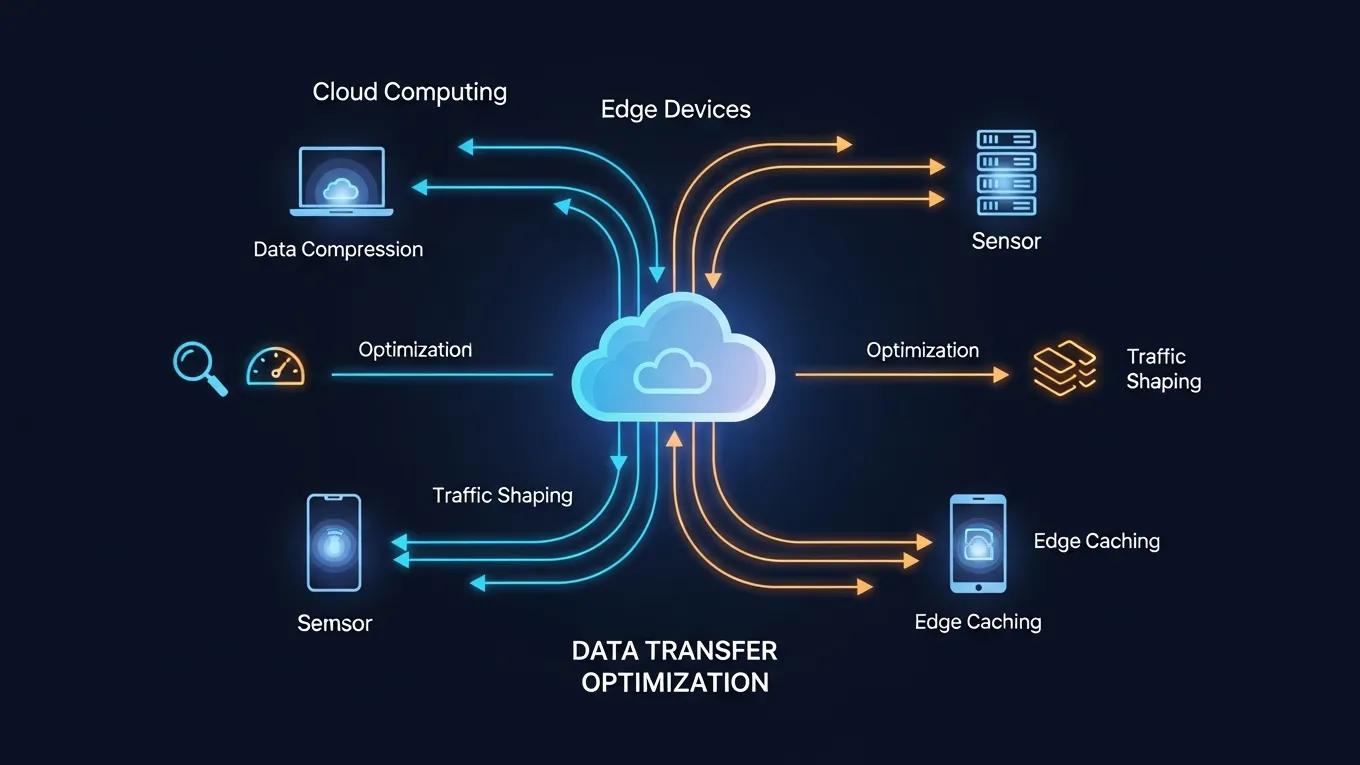
Network-level optimization reduces the number of round trips, shrinks data payloads, and delivers content closer to users, thereby decreasing latency and enhancing reliability across various bandwidth conditions. Minimizing API calls through aggregation, caching responses, and using delta updates lowers the frequency of client-server exchanges and conserves battery life on mobile devices by reducing radio usage. Edge delivery via CDNs minimizes physical distance and TCP/TLS handshake overhead. Adaptive bitrate streaming further reduces buffering by matching video segment bitrates to the available network throughput. Collectively, these strategies decrease video start times, minimize buffering, and improve the perceived speed of interactive features.
Simple solution: Combine API requests and use caching aggressively to reduce network round trips and improve responsiveness.
Below are practical network strategies to implement and measure for consistent speed improvements.
- Batch or combine API requests to reduce the number of round trips and protocol overhead.
- Compress or encode payloads efficiently and remove unnecessary fields to shrink response sizes.
- Utilize CDNs and adaptive streaming to lower latency and adapt to fluctuating bandwidth conditions.
Implementing these techniques reduces the time it takes to deliver content and enhances overall perceived performance. Next, we will cover request-level optimizations and CDN/streaming patterns.
Minimize API calls and payload optimization
Reducing the number of network requests is often the most impactful optimization for mobile responsiveness, as each round trip introduces latency and consumes device radio resources. Effective patterns include using aggregation endpoints, implementing pagination for lists, and employing delta-sync approaches that transmit only changed data. Using compressed payloads and eliminating unused fields further minimizes data transfer. For high-volume data endpoints, consider binary encodings where appropriate, but carefully weigh the added complexity against interoperability and debugging ease. Instrumenting request latencies and payload sizes allows you to set measurable targets and detect regressions introduced by new fields or features.
Simple solution: Regularly audit your network requests and remove unnecessary data to streamline response sizes.
When optimizing payloads, ensure responses contain only the attributes necessary for the current view. Utilize cache headers and client-side caching to prevent redundant requests, which prepares the app for the CDN and ABR strategies discussed next.
This table demonstrates how CDN configurations and edge behaviors contribute to latency and reliability improvements in mobile content delivery.
Simple solution: Use CDN edge caching with smart cache policies to improve load times and reliability.
Use CDNs and adaptive streaming for content delivery
CDNs reduce transport distance by serving content from edge servers, thereby lowering the round-trip time for media segments and static assets—a critical factor for video and large resources. Adaptive Bitrate (ABR) systems segment media into smaller chunks, offering multiple bitrates and a manifest file that guides clients to request the optimal bitrate based on measured throughput. This approach minimizes rebuffering and improves video start times. ABR systems benefit significantly from CDN edge caching for rapid segment delivery and can be fine-tuned with bitrate ladders and lower-bitrate fallbacks for poor connectivity. Additionally, providing offline or progressive download options serves as a fallback for unreliable connectivity, ensuring continuous playback.
Simple solution: Implement adaptive streaming with CDN support to deliver videos smoothly across all network conditions.
The effectiveness of adaptive streaming in optimizing mobile video quality and user experience is further validated by specialized research.
Adaptive Streaming for Mobile Video Optimization
Mobile network operators are deploying video optimization techniques to improve the Quality of Experience (QoE) for mobile video users. In this paper, we propose a novel video optimization technique, named Adaptive Guaranteed Bit Rate (AGBR), for HTTP-based Adaptive Streaming (HAS).
Mobile video optimization at the base station: Adaptive guaranteed bit rate for HTTP adaptive streaming, H Viswanathan, 2013
Design ABR manifests and client heuristics to prioritize fast video start times and minimal buffering. Instrument CDN hit rates and segment fetch latencies to optimize cache placement and eviction policies.
Simple solution: Monitor CDN metrics and adjust ABR configurations regularly for best streaming performance.
How do you enhance UI/UX performance and rendering on mobile devices?
UI performance hinges on maintaining low frame times, avoiding layout thrash, and delivering a visually stable interface that responds instantly to user input. Targeting 60 frames per second (FPS) keeps frame budgets around 16ms per frame, which research indicates significantly impacts user engagement; specifically, apps that maintain 60 FPS see 52% higher user engagement. Prioritize the critical rendering path, minimize synchronous layout and paint operations, and leverage GPU-accelerated compositing wherever possible. Perceived performance improvements, such as responsive UI elements, also yield measurable gains, with responsive elements boosting user interaction metrics by up to 37%.
Simple solution: Keep UI rendering within 16ms per frame and use GPU acceleration to deliver smooth, responsive interfaces.
Comprehensive studies highlight the critical role of architectural design and UI
in achieving robust and fault-tolerant
.
iOS App Performance: Architecture, UI, and Fault Tolerance
This article explores strategies for improving the performance and fault tolerance of iOS applications, with a focus on architectural solutions and user interface optimization. It examines common causes of application failures, including main thread blocking, network instability, and overloaded visual components. The importance of proactive and reactive approaches is emphasized, as they ensure resilience to failures and minimize their impact on user experience. Tools for resilience testing are analyzed, including logging, crash analysis, performance profiling, and failure simulation in controlled environments. The article concludes that integrating architectural design with asynchronous programming practices and strategic testing is essential for developing stable, adaptive, and user-centric iOS applications. PERFORMANCE AND FAULT TOLERANCE OF IOS APPLICATIONS: OPTIMIZATION STRATEGIES AT THE ARCHITECTURAL AND UI THREAD LEVELS, 2025
Begin by defining rendering budgets and identifying performance bottlenecks; next, we will discuss specific tactics for frame rate and lazy loading to achieve smoother rendering.
Simple solution: Set clear performance budgets and use profiling tools to find and fix UI bottlenecks.
Optimizing UI rendering and frame rate
Frame budget discipline involves keeping per-frame work within the 16ms window required for 60 FPS, ensuring that animations and user input feel smooth. Reduce layout passes by simplifying view hierarchies, avoid costly paint operations during scrolling, and utilize off-main-thread rendering or texture layers for complex visuals. Profiling tools can pinpoint expensive measurement and paint operations, and targeted fixes—such as simplifying styles or replacing complex widgets with more efficient alternatives—often yield immediate improvements. Establish a performance budget that includes average frame time and enforce it in your CI pipeline by failing builds that exceed the budget, thereby preventing regressions.
Simple solution: Use CI pipelines with performance tests to avoid UI slowdowns before release.
Prioritizing these fixes helps maintain interactivity and reduces user abandonment linked to sluggish interfaces, naturally leading into lazy loading strategies to further decrease upfront rendering work.
Lazy loading and smooth transitions
Lazy loading defers the loading of non-critical UI elements—such as images, secondary lists, or rich media—until after the primary viewport is interactive. This improves perceived speed and reduces memory pressure. Implement skeleton screens and progressive reveals to provide users with immediate context while assets load, and defer loading video thumbnails and large images until they enter the viewport. Design animations to be lightweight and interruptible, ensuring they never block user input; prefer compositing-friendly transforms over layout-based animations that can be more resource-intensive. These practices reduce peak CPU/GPU load and deliver consistent frame rates on both low-end and high-end devices.
Simple solution: Implement lazy loading for non-essential elements and use lightweight animations to keep the UI responsive.
Progressive rendering and thoughtful animation design enhance perceived responsiveness while minimizing rendering overhead, which naturally leads into power and data optimizations for streaming applications.
How do you optimize battery life and data usage in streaming apps?
Streaming apps need to balance playback quality with power and data constraints by minimizing device wakeups, prioritizing hardware-accelerated decoding, and offering users explicit controls over data consumption. Background tasks should be batched to reduce radio and CPU wakeups, codecs should be selected for efficient decoding on target devices, and download strategies should respect user settings for cellular versus Wi-Fi usage. Offline viewing is a crucial feature for users with limited data plans and reduces the power consumption associated with live streaming by avoiding continuous buffering under poor network conditions.
Simple solution: Batch background tasks and use hardware-accelerated codecs to save battery while maintaining good playback quality.
The following checklist outlines key actions that product and engineering teams should implement to reduce battery and data costs for streaming scenarios.
- Batch and schedule background tasks using OS-recommended batching APIs to minimize frequent radio wakeups.
- Prefer hardware-accelerated codecs and container formats to reduce CPU and GPU load during decoding.
- Offer granular user controls for streaming quality and downloads to allow users to manage their data usage.
These controls help users manage trade-offs while the app conserves energy and bandwidth. Below, we detail background task design and download strategies.
Battery-efficient background tasks and media optimization
Design background tasks to run within scheduled windows and to consolidate work, ensuring the device’s radio and CPU wake up only when necessary. This approach reduces overall energy consumption compared to frequent, small tasks. Utilize platform-native batching and doze-aware APIs to align with the OS scheduler and avoid disrupting power-saving modes. For media playback, favor hardware-accelerated decoding and efficient codecs to minimize CPU usage. Avoid constant polling for network status; instead, use push or event-driven mechanisms whenever possible. These steps reduce both battery drain and heat generation, enhancing user comfort during long viewing sessions.
Simple solution: Schedule fewer, but larger, background tasks to lower device wake-ups and power usage.
Efficient background processing and media choices preserve battery life while enabling offline playback and prefetching capabilities that improve streaming stability.
Data usage controls and offline viewing strategies
Data controls empower users to set streaming quality limits and restrict automatic downloads over cellular connections, protecting them from unexpected data charges. Implement adaptive download strategies that prioritize initial playback segments and defer less critical assets. Provide clear policies for storage and cache eviction to ensure offline libraries remain manageable. Techniques like progressive download and segmented storage enable playback while minimizing redundant downloads and allow the app to automatically prune outdated content. Offering users transparency and choice regarding bitrate caps and download scheduling reduces churn caused by data overages while maintaining content accessibility.
Simple solution: Give users clear options to manage data and download settings to balance quality and cost.
User-facing controls, combined with adaptive download policies, help manage both battery and data usage, setting the stage for effective performance measurement at scale.
How do you measure, monitor, and maintain performance at scale?
Observability connects optimization efforts to tangible outcomes by tracking key performance indicators (KPIs), alerting on regressions, and enabling root-cause analysis when performance degrades. Track core metrics—app launch time, video start time, buffering rate, memory and CPU usage, battery drain, and crash rates—and correlate them with software releases and user behavior. Instrument playback paths and network calls with traces and metrics, feed dashboards and alerts to SRE and product teams, and run performance regression tests in your CI pipeline to catch degradations before they impact users. Continuous measurement and prioritized remediation lead to steady improvement rather than reactive firefighting.
Simple solution: Set up real-time dashboards and alerts for key metrics to catch and fix problems early.
The list below identifies essential KPIs to monitor and their purpose in maintaining a healthy mobile service.
- App launch time: measures cold and warm starts and directly impacts initial conversion rates.
- Video start time and buffering rate: determine playback quality and user satisfaction.
- Memory/CPU usage and crash rates: indicate stability and resource-related regressions.
Collecting these metrics and integrating them into alerting and CI workflows enables rapid rollbacks or fixes when performance thresholds are breached. Next, we will outline real-time monitoring approaches and recommended thresholds.
Real-time performance monitoring and analytics
Real-time monitoring combines application telemetry, traces, logs, and synthetic checks to quickly detect regressions and provide context for analysis. Instrument critical user flows—startup, authentication, content browsing, and playback—so you can trace a slow video start back to a CDN miss, a server-side delay, or a client-side deserialization issue. Dashboards should display both user-impacting aggregates (percentiles for launch time and video start) and low-level signals (GC pause durations, thread stalls) to guide troubleshooting. Use alerts based on defined thresholds and correlate these alerts with release tags and trace context to expedite root-cause determination.
Simple solution: Use integrated telemetry to link client and server data for faster problem diagnosis.
This table maps high-level KPIs to measurement methods and actionable thresholds, with app launch time benchmarked explicitly against recommended guidelines.
Simple solution: Regularly review these KPIs and adjust development priorities accordingly to meet performance goals.
Internal app performance data and continuous optimization
Utilize internal telemetry and controlled experiments to validate performance changes and prioritize remediation efforts. Establish a regular cadence for both minor and major performance reviews to keep performance goals current. Schedule performance maintenance with Major Reviews: Annually (e.g., April 2025) and Minor Updates: Quarterly (e.g., July 2024, October 2024). Allow for As-Needed updates for significant industry shifts, new mobile OS releases impacting performance, or major Netflix app feature launches. Combine A/B experiments with performance telemetry to confirm that optimizations enhance user experience without introducing unintended regressions. Triage issues based on user impact and roll out validated fixes progressively to minimize risk.
Integrating performance checks into CI and release processes transforms one-off fixes into lasting improvements. Establishing review cadences ensures that teams periodically revisit their assumptions.
For teams managing large-scale streaming applications, applying these measurement and process patterns supports reliable, consistent user experiences. As a prime example, the Netflix Mobile Application is a core product where maintaining fast app launch, efficient data usage, and reliable playback is central to the service’s value proposition. Netflix, Inc. is a global streaming entertainment service whose core business heavily relies on its mobile application, used by millions worldwide to stream movies, TV shows, and documentaries.
- Monitoring: Correlate client metrics with server telemetry to pinpoint root causes.
- Testing: Implement CI-based performance regression checks on critical user paths.
- Process: Utilize quarterly/minor and annual/major reviews to sustain long-term performance.
Simple solution: Keep performance governance regular and data-driven to ensure high standards over time.
Frequently Asked Questions
What are the key performance indicators (KPIs) for mobile app optimization?
Key performance indicators (KPIs) for mobile app optimization include app launch time, video start time, buffering rate, memory and CPU usage, and crash rates. These metrics help developers assess the app’s responsiveness, stability, and overall user experience. Monitoring these KPIs allows teams to identify performance regressions, correlate them with user behavior, and prioritize fixes based on user impact. Regularly tracking these metrics ensures that the app maintains optimal performance and meets user expectations.
Simple solution: Focus on measuring app launch, video start time, and stability metrics regularly.
How does lazy loading improve mobile app performance?
Lazy loading enhances mobile app performance by deferring the loading of non-essential UI elements until they are needed. This approach reduces the initial load time and memory usage, allowing users to interact with the app more quickly. By prioritizing critical content and loading secondary elements in the background, lazy loading improves perceived speed and responsiveness. Additionally, it minimizes the app’s resource consumption, which is particularly beneficial for users on limited data plans or older devices.
Simple solution: Implement lazy loading for images and secondary content to speed up initial app responsiveness.
What strategies can be used to optimize battery life in streaming apps?
To optimize battery life in streaming apps, developers can implement strategies such as batching background tasks, using hardware-accelerated codecs, and providing user controls for data consumption. By scheduling background tasks to minimize frequent wakeups and choosing efficient codecs for playback, apps can significantly reduce power draw. Additionally, offering users the ability to adjust streaming quality based on their preferences helps manage data usage and battery life, ensuring a better overall experience during extended viewing sessions.
Simple solution: Batch updates and prioritize efficient decoding methods to conserve battery during streaming.
How can developers ensure continuous performance monitoring?
Developers can ensure continuous performance monitoring by integrating telemetry into their apps to track key metrics in real-time. This includes setting up dashboards to visualize performance data, implementing alerting systems for regressions, and conducting regular performance regression tests during the CI/CD process. By correlating client-side metrics with server-side telemetry, teams can quickly identify and address performance issues, ensuring that the app remains responsive and stable for users over time.
Simple solution: Use real-time telemetry and automated alerts to catch regressions quickly.
What role does network optimization play in mobile app performance?
Network optimization plays a crucial role in mobile app performance by reducing latency and improving data transfer efficiency. Techniques such as minimizing API calls, aggregating requests, and using content delivery networks (CDNs) help decrease round-trip times and enhance the user experience. By optimizing data payloads and employing adaptive streaming, developers can ensure that users receive content quickly and reliably, even under varying network conditions, which is essential for maintaining user engagement and satisfaction.
Simple solution: Aggregate and cache network requests, and leverage CDNs for faster data delivery.
How can modular design benefit mobile app development?
Modular design benefits mobile app development by allowing developers to isolate features into separate, lazy-loadable modules. This approach reduces the initial app bundle size and improves cold-start times, as only essential components are loaded at launch. Additionally, modular design facilitates easier updates and testing, as changes to one module do not affect the entire application. This leads to a more efficient development process and a more stable app, ultimately enhancing user experience and retention.
Simple solution: Structure your app as small, independent modules to speed up development and runtime performance.
What are the best practices for optimizing UI rendering in mobile apps?
Best practices for optimizing UI rendering in mobile apps include maintaining a frame budget to ensure smooth animations, minimizing layout thrash, and using GPU-accelerated rendering techniques. Developers should aim for 60 frames per second (FPS) by keeping per-frame work under 16ms. Techniques such as flattening view hierarchies, avoiding expensive paint operations, and implementing lazy loading for non-critical UI elements can significantly enhance rendering performance. These practices lead to a more responsive and engaging user interface.
Simple solution: Keep the UI rendering under 16ms per frame and reduce visual complexity where possible.
Conclusion
Optimizing mobile app performance is essential for enhancing user experience, reducing churn, and ensuring long-term engagement. By implementing strategies such as efficient code architecture, network optimization, and UI enhancements, developers can significantly improve speed, reliability, and efficiency. These improvements not only protect user retention but also position your app as a competitive choice in a crowded market. Discover our comprehensive resources and tools to elevate your mobile app performance today.
Simple solution: Prioritize continuous optimization efforts focused on user experience and stability for lasting success.